Plinko Auto Bet repeats drops using your chosen stake, board and round count; Turbo speeds up play without improving the odds. For a first demo run, use a fixed stake, one ball per round, the smallest finite count available and no automatic stake increases. Enable a cash-decrease stop if the game offers one, then check the settled history before starting another series. A stop-loss threshold can be passed by a settling round; it does not guarantee an exact final balance.
Set up a short Auto Bet run
We recommend learning these controls with virtual credits because a mistaken count or stake setting can repeat before you notice it. Our free Plinko demo guide explains the difference between a teaching board and a supplier demo. AUD amounts below illustrate costs; a FUN or USD label in a demo does not establish an Australian-dollar stake limit.
- Read the title and supplier. Open the game rules and identify whether the stake buys one ball or a batch. Check the currency beside the balance.
- Make one manual drop. Select one ball, keep paid extras off and compare the balance debit with the stake. An A$0.20 drop returning 0.5x credits A$0.10 and loses A$0.10.
- Open Auto, Auto Play or Autobet. Keep the same rows and risk setting. Select a finite round count: SPRIBE’s pictured panel offers a three-round option; other interfaces use an editable number field.
- Keep the stake fixed. If the panel offers “On loss” or “On win” actions, turn off increases and decreases. Check that a reset action points to the intended starting stake.
- Activate the available stop conditions. Entering an amount is insufficient if its switch remains off. Read whether the field refers to cash decrease, session profit or a single payout.
- Start, then locate Stop. Observe the first series without leaving the screen. End it with the stop control, allow committed rounds to settle and inspect the history before restarting.
If a game lacks a cash-decrease stop, a small round count at a fixed stake still bounds the planned amount wagered. Do not assume a hidden loss-limit field exists because another Plinko version has one.
Auto controls differ between Plinko versions
| Game | How the series starts and ends | What to check |
|---|---|---|
| Classic BGaming Plinko | Select Auto, enter the number of automatic bets and press Play. Play becomes Stop with the remaining count. The series ends at the count, on Stop or when funds are insufficient. | Use the finite count and the Stop control when budgeting a run; check the actual panel before relying on any additional limit. |
| SPRIBE Plinko | The circular-arrows control opens Auto Play. The pictured options are 3, 10, 25, 100, 200 and 500 rounds. | Colour selection and separate switches for “Stop if cash decreases by” and “Stop if single win exceeds”. |
| 2UP Originals Plinko | Tap Auto, choose stake, risk, rows and number of bets, then Start Auto Bet. | Turbo skips the animation. Set the number of bets before starting; inspect the panel for any additional stop settings. |
The BGaming Plinko review and SPRIBE Plinko review cover their different boards and payouts.
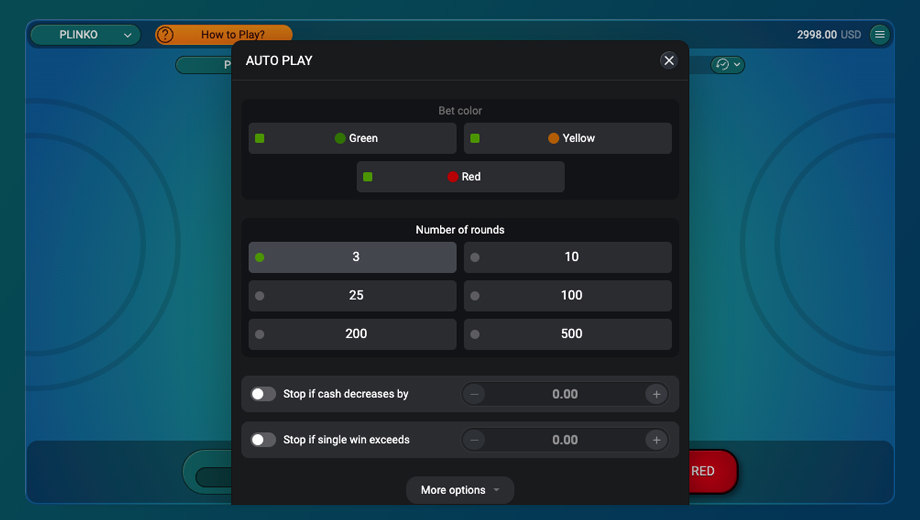
Check colour selections separately from round count. If an interface permits multiple simultaneous selections or multiple balls, use its displayed total debit to establish what one round purchases before budgeting an automated series.
BetGames Plinko! Autoplay starts with a selected round count and the Bet button; the same button stops the series. Its separate lightning-bolt Turbo toggle controls faster play. The review includes costs at its 96% RTP.
Loss limits, profit targets and single-win stops
A cash-decrease stop monitors a balance reduction; a single-win stop monitors one award. A cumulative profit target, where offered, monitors the series result. Those conditions can produce different decisions after exactly the same drop.
| Setting | Meaning | Common mistake |
|---|---|---|
| Cash decreases by A$10 | An A$90 balance represents an A$10 decrease from the starting balance, if the control uses that reference. | Entering A$90 into a field asking for the amount of decrease. |
| Single win exceeds A$10 | One award must exceed A$10. At a fixed A$0.20 stake, a 60x pocket returns A$12. | Expecting several small awards totalling A$10 to trigger it, or assuming “exceeds” includes equality. |
| Profit target A$10 | For a control based on net balance change, the target corresponds to A$110. | Confusing A$10 in gross payouts with A$10 of profit after stakes. |
Read the reference point: a decrease from the series starting balance differs from a trailing stop measured from the highest balance reached. Stop and inspect the settings when changing stakes or starting another series; carrying over a number does not establish that the balance reference also carries over.
A threshold can be crossed during settlement. For example, start with A$100 and an A$10 loss threshold. If the balance reaches A$91 and a subsequent A$2 round returns A$0.40, it finishes at A$89.40, already A$0.60 beyond the threshold. This example assumes the next round was allowed to start above A$90. If several bets are already accepted, they add further exposure. Pressing Stop does not establish that an accepted bet has been cancelled.
What a fixed-stake series costs in AUD
At A$0.20 per ball, 100 single-ball rounds wager A$20; 500 wager A$100. At A$0.50 per ball, the same counts wager A$50 and A$250. Winnings may fund later bets, so turnover can exceed the starting balance. Neither the turnover nor the theoretical expected loss is a promise about the session’s final balance.
| Rounds | Total wagered | Expected loss at 99% RTP | Expected loss at 97% RTP |
|---|---|---|---|
| 10 | A$2 | A$0.02 | A$0.06 |
| 25 | A$5 | A$0.05 | A$0.15 |
| 100 | A$20 | A$0.20 | A$0.60 |
| 500 | A$100 | A$1 | A$3 |
These are fixed-count expectations calculated from the stated RTP assumptions. A run stopped by a balance condition has a variable number of bets, so the fixed-count row is not its predicted result. High volatility can produce a loss much larger than the expectation even with a high RTP. Our RTP and volatility comparison explains the distinction.
Count batches and feature charges
In Evoplay Plinko Blast, repeated manual clicks can launch overlapping balls without Autoplay. Every ball remains a separate bet, so switching Autoplay off does not by itself limit manual launch costs.
If one launch contains 10 balls at A$0.20 each, it costs A$2. Repeating that launch 25 times purchases 250 balls and wagers A$50. Read whether the Auto count means launches or individual balls in the selected game.
In Football Plinko, enabling all three paid features doubles the base cost per purchased ball. A hypothetical A$0.20 base stake then costs A$0.40; 10 purchased balls across 25 repeated launches cost A$100 before any returns. A base-stake field alone understates that series’ exposure.
Why increasing the bet after a loss escalates exposure
An “increase by 100%” instruction doubles the stake. Starting at A$0.20, eight successive doubled stakes are A$0.20, A$0.40, A$0.80, A$1.60, A$3.20, A$6.40, A$12.80 and A$25.60: A$51 wagered. The next stake would be A$51.20. This describes exposure if the increase fires after each round; a maximum bet or insufficient funds can end the sequence sooner.
Plinko’s partial returns make loss progressions especially misleading. An A$0.20 ball at 0.2x returns A$0.04 and loses A$0.16. An award labelled “Win” can therefore still be a net loss. Before interpreting an “On win” reset, establish how that game classifies below-stake payouts. Doubling after losses cannot guarantee recovery when the next paying pocket also returns less than the stake.
In Reddit’s r/Stake discussion “Been playing originals for a year now, never used autobet”, players describe using Auto to avoid repeated clicking, alongside worries about rapid balance depletion. In r/stakeus, “Whats the move?” includes advice to raise stakes after losses while chasing loyalty progress. These are player opinions, not evidence that automation or a progression improves returns. Our choice for a demo comparison is a fixed stake, because it keeps the cost per drop visible and avoids escalating the next bet after a loss.
Turbo changes the pace, not the payout table
For unchanged rows, risk and game rules, increasing animation speed does not improve RTP or make an edge pocket due. Turbo and Instant labels describe presentation or launch speed; read the selected game’s controls rather than assuming every lightning icon has the same effect.
Consider two hypothetical rates at A$0.20 per ball: 30 drops per minute wager A$6 per minute, while 300 wager A$60. Over five minutes those rates produce A$30 and A$300 of turnover. At an assumed 99% RTP, their fixed-count expected losses are A$0.30 and A$3. The example assumes every scheduled bet is completed at the same stake.
A faster animation also gives you less time to spot the wrong currency, a multi-ball selection or an enabled stake increase. Keep normal speed during the initial control check. A streak in the history does not predict the next independent result; the guide to RNG, fairness and predictors explains why.
Stop, settle and check before restarting
- Use the game’s Stop button or active Auto counter. Wait for accepted rounds to appear in the settled history.
- Compare total stakes, total returns and net balance change. Check round IDs if an animation or connection was interrupted.
- If the count or debit differs from the intended settings, keep the history and resolve the discrepancy before placing another series.
Closing a tab or losing a connection is not a dependable stop instruction. After reconnecting, inspect the Auto status and settled bets before pressing Start again. If limits are repeatedly overridden or restarted to recover losses, end the session rather than choosing a larger series.
Australian access and spending controls
The Interactive Gambling Act prohibits providers from offering online casino services to people in Australia. An AUD balance, an Auto button or an overseas licence does not authorise an offshore casino to serve Australians. Our Australian legality guide explains the local framework.
A game’s Auto stop applies to that series; a deposit limit controls money added to an account. Neither establishes a spending cap across other games or accounts. Use the Australian gambling support guide for help with broader limits. Free, confidential telephone support is available on 1800 858 858, 24 hours a day. When a series ends, keep it stopped while checking the total debit and returns. Change only one setting before the next virtual-credit trial.